
System dependability: availability, reliability, durability & MTBF/MTTR
The vocabulary of dependable systems. How to calculate availability, what fault tolerance actually requires, and the MTBF/MTTR mental model.

Before reading this article, please note that there is a good amount of unfamiliar terms you might come across with, because this topic is introductory and generic, it would span a wide range of different domains within system design, the important point is to grasp a basic idea before the deeper dive in later articles
Many software engineers often say "available," "reliable," and "durable" like they mean the same thing. They don't. Mixing them up leads to building the wrong thing. This post gives you clear definitions, simple math, and practical ways to achieve each one.
Availability
Availability is the percentage of time your system is working and can handle requests.
It’s a time-based measurement. A system down for 8.76 hours per year has 99.9% availability, no matter why it went down.
Here’s what “nines” mean in real downtime:
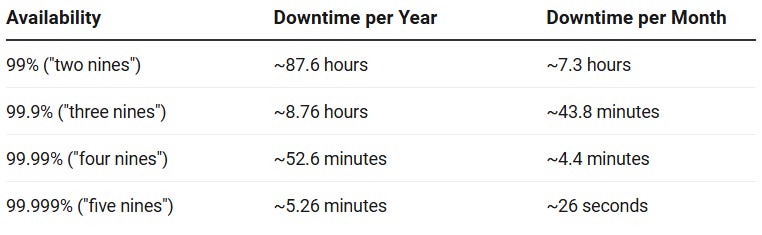
Important: Availability is about the whole system from the user’s view. A working database doesn’t matter if the load balancer in front of it is dead.
Why availability matters
Downtime has a clear cost. An e-commerce site making $1M/day loses about $700 per minute of downtime. For SaaS products, long outages mean paying penalties and losing customers. For internal tools, downtime blocks every team that depends on you. Beyond money, repeated outages destroy user trust and trust is much harder to rebuild than uptime.
The hidden cost: every minute your system is down is a minute your competitors are up.
How to get high availability
You have two levers: fail less often (increase MTBF) or recover faster (decrease MTTR). These techniques help with one or both.
Remove single points of failure (SPOF). Any component with no backup is an SPOF. Find them and add redundancy.
Run multiple copies. Deploy several instances of stateless services behind a load balancer. If one dies, traffic goes to the others.
Use active-passive or active-active replication. For databases, keep standby copies. Active-passive has a warm backup ready to take over. Active-active runs multiple copies handling writes at once, harder to set up, but higher availability.
Add health checks and auto-failover. Redundancy is useless if you don’t detect failures. Load balancers must constantly check health and route around bad instances automatically. Humans are too slow.
Deploy without downtime. Use rolling updates, blue-green, or canary releases. Deployments are a major cause of availability incidents.
Use circuit breakers. When a downstream service starts failing, the circuit breaker trips and returns a quick fallback instead of waiting for a timeout. This stops one slow service from killing your whole system.
Degrade gracefully. Design the system to still work (with fewer features) when non-critical services are down. A search page without recommendations is better than a 500 error.
Spread across regions. Put systems in multiple geographic locations to survive a cloud outage or datacenter failure. Route traffic to the healthiest region.
Reliability
Reliability is the chance your system runs without any failure for a specific amount of time under normal conditions.
Availability asks “how much total uptime?” Reliability asks “what’s the chance it hasn’t broken yet by time T?”
A system can have high availability but low reliability. Example: a service crashes every 30 minutes but restarts in 30 seconds. Availability is about 97%, but reliability (chance of surviving 30 minutes without a crash) is near zero. On the flip side, a system designed for long runs has high reliability.
When reliability matters most: workloads where a failure mid-operation is a disaster, financial transactions, batch ETL jobs, firmware updates. Availability matters most for interactive work where quick restarts are fine.
The simple reliability formula
Given a constant failure rate (average failures per hour), the chance a system survives to time t without failure is:
Where λ is the failure rate. It’s just 1 divided by MTBF (mean time between failures):
Example: A service fails on average every 500 hours (MTBF = 500). What’s the chance it runs for 100 hours without failing?
About 82% chance. For 500 hours:
Only 37% — which makes sense because MTBF is an average, not a promise. Half of all failures happen before you reach the MTBF.
How to get high reliability
Make operations idempotent. Design operations so you can safely retry them without side effects. A payment endpoint that checks for duplicate transaction IDs before charging means retries are safe.
Use transactions. Database transactions make sure operations either finish completely or roll back fully. For distributed systems, patterns like Saga with compensating transactions give similar guarantees.
Add checkpoints to long jobs. Save progress at regular intervals so a failure can resume from the last checkpoint instead of starting over. Critical for ETL pipelines.
Test thoroughly. Unit tests catch logic errors. Integration tests catch interaction bugs. Chaos engineering (intentionally breaking things in production or staging) tests if your system behaves correctly during real failures.
Use immutable infrastructure. Instead of patching running servers (which creates unknown states), replace them with fresh copies from a known-good image. Removes a whole class of reliability bugs.
Pin dependency versions. Uncontrolled updates are a common source of reliability problems. Pin versions, test upgrades carefully, and roll out changes gradually with canary deployments.
Fault Tolerance
Fault tolerance is a system’s ability to keep working correctly when some components fail.
A fault-tolerant system hides failures — the user never sees an error. This is stricter than high availability, which allows brief degradation.
Fault tolerance requires three things:
Redundancy — multiple copies doing the same job.
Failure detection — the system knows when something fails (heartbeats, health checks).
Failover — traffic moves to a healthy component automatically.
Redundancy alone isn’t fault tolerance. If your backup database needs a human to switch over, that’s high availability, not fault tolerance.
Why fault tolerance matters
At large scale, component failure is routine — not an exception. Google and Amazon lose multiple hard drives every day. Netflix runs Chaos Monkey to randomly kill production instances. The design philosophy: assume failure will happen, design so it doesn’t matter.
For strict SLAs(See definition below) — finance, emergency services, telecom — even brief downtime has legal, financial, or safety consequences. Fault tolerance is what makes an outage a non-event.
SLA (Service Level Agreement) — A formal contract between a service provider and a customer that defines the minimum level of service the provider must deliver, along with penalties for failing to meet those commitments.
How to get fault tolerance
The techniques are similar to high availability, but applied more strictly with zero downtime required.
Use consensus protocols. Distributed systems use algorithms like Raft or Paxos to agree on state even when some nodes fail. As long as a majority (quorum) of nodes is reachable, the system keeps working and stays consistent.
Use bulkheads. Isolate components into separate resource pools so one failure can’t exhaust resources for everything else. If your recommendation service hangs but shares a thread pool with checkout, checkout hangs too. Bulkheads prevent this.
Set timeouts and retry with backoff. Never block forever on a downstream call. Set explicit timeouts. Retry transient failures with exponential backoff and jitter to avoid all retrying at once when the service recovers.
Design services to be stateless. Stateless services can be replaced instantly without coordination — any instance works. Stateful services need data migration or leader election on failover, which takes time and adds failure modes.
MTBF and MTTR
These two numbers are your practical handles for availability.
MTBF — Mean Time Between Failures
MTBF is how long your system runs on average between failures. It depends on hardware quality, software stability, load, and environment.
Higher MTBF means failures are rare. You raise MTBF by building more reliable components, reducing complexity, and removing single points of failure.
MTTR — Mean Time To Recovery
MTTR is how long it takes on average to get back online after a failure. It includes everything from detection → diagnosis → fix → verification.
MTTR breaks down into:
Time to detect → from failure happening to your team knowing about it
Time to diagnose → from knowing to finding the root cause
Time to fix → from root cause to deployed fix
Most teams don’t know which phase takes the longest. Measuring each separately tells you where to invest: long detection time? Fix alerting. Long diagnosis? Add tracing and better logs. Long fix time? Automate deployments.
You lower MTTR with better monitoring, automated failover, runbooks, on-call tooling, and deployment automation. A system with mediocre MTBF can still hit four-nines availability if MTTR is low enough.
How MTBF and MTTR Drive Availability
These two metrics directly give you availability:
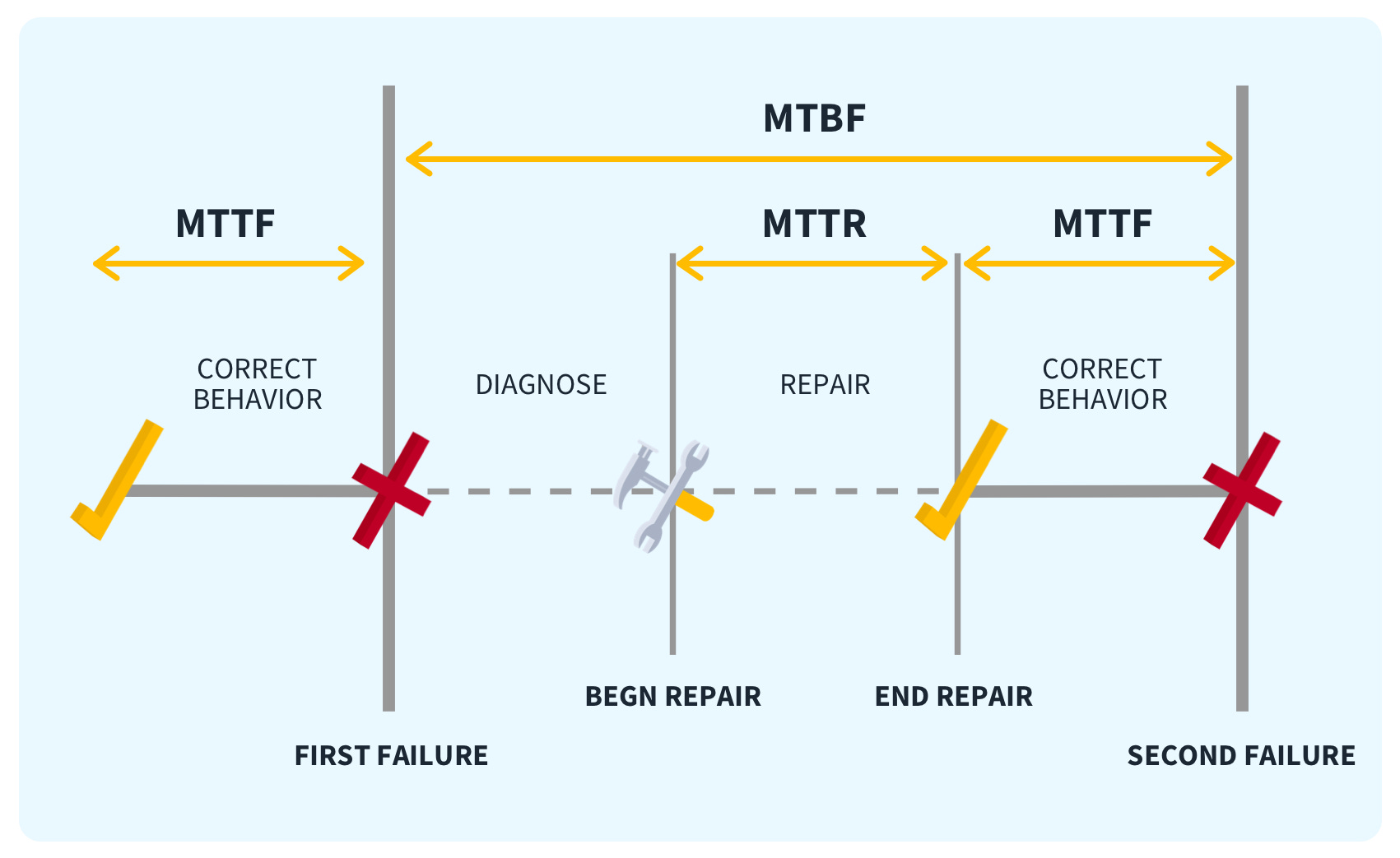
This is your core mental model.
Example: A service fails once every 200 hours (MTBF = 200 h). Each failure takes 2 hours to recover from (MTTR = 2 h). Availability = 200 / (200 + 2) = 99.01%
Now add automation and cut MTTR to 0.2 hours (12 minutes):
Availability = 200 / (200 + 0.2) = 99.9%
Same failure rate. Lowering recovery time by 10x added a whole nine. In real systems, MTTR is often the easier lever because it’s about tooling and automation, not waiting for hardware to get better.
Planned vs. Unplanned Downtime
Not all downtime is the same.
Unplanned downtime comes from failures: hardware breaks, software bugs, networks split, attacks. This is what MTBF and MTTR model. You want it rare (high MTBF) and short (low MTTR).
Planned downtime is intentional: maintenance windows, schema changes, deployments, upgrades. Many companies exclude planned downtime from SLAs — but users experience both. A system that’s “up” 99.99% of the time but has a 4-hour maintenance window every month is really 99.45% available to users.
Total downtime against an SLA:
If your SLA allows 8.76 hours/year (99.9%) and you have two 2-hour maintenance windows, your unplanned budget is only 4.76 hours — about 28 minutes per month.
Goal: Eliminate planned downtime wherever possible.
Schema migrations should be backward-compatible and run without locking tables. Use tools like
pt-online-schema-change.Deployments should have zero downtime via rolling or blue-green updates.
Infrastructure upgrades should roll out in place or replace in parallel — never take down and replace.
The less planned downtime you have, the more budget you keep for the unplanned kind.
Availability in Systems with Multiple Parts
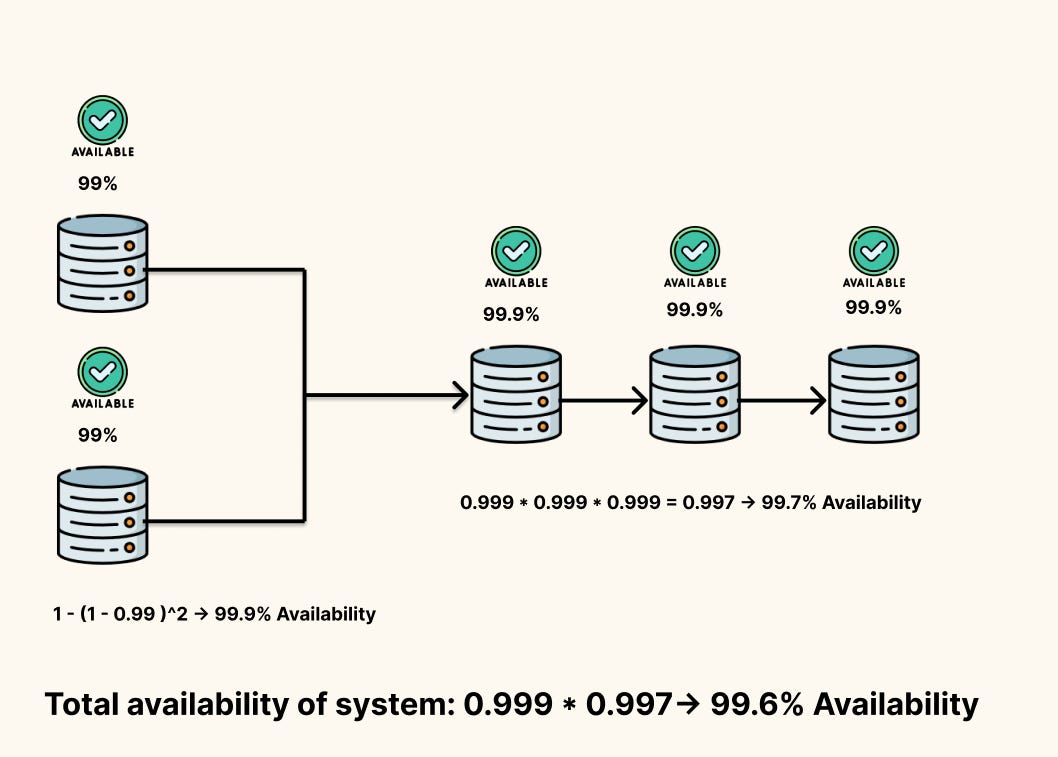
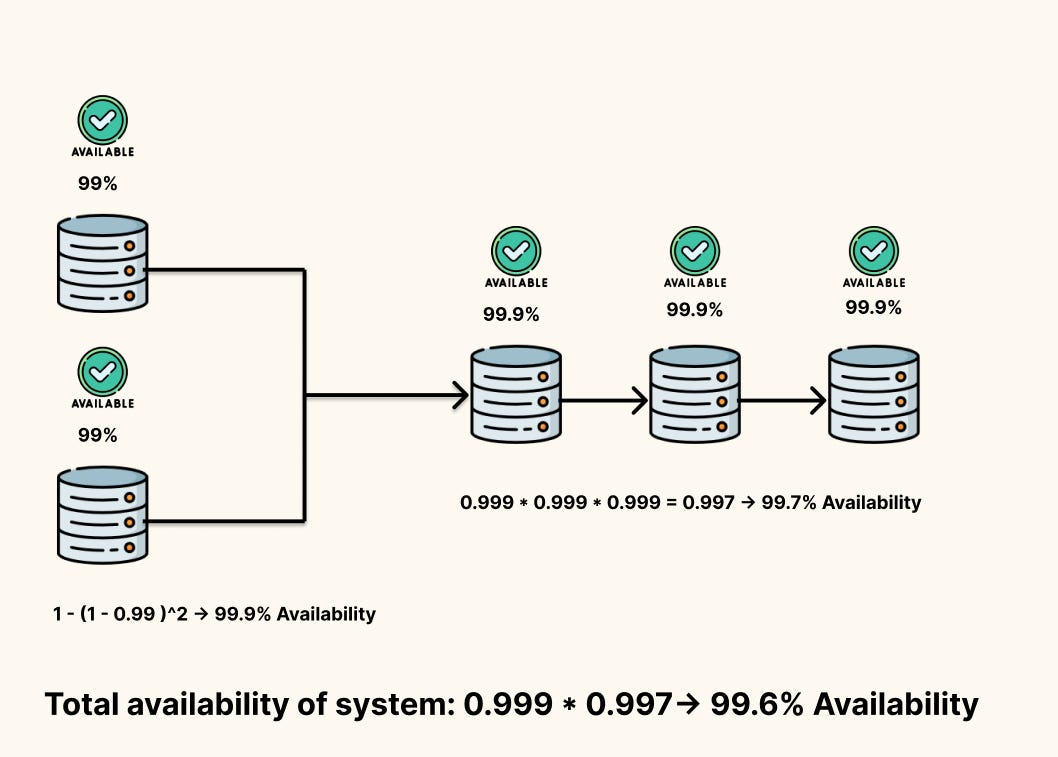
Real systems are chains of components. If every component must be up for the system to work(Series), you multiply their availabilities:
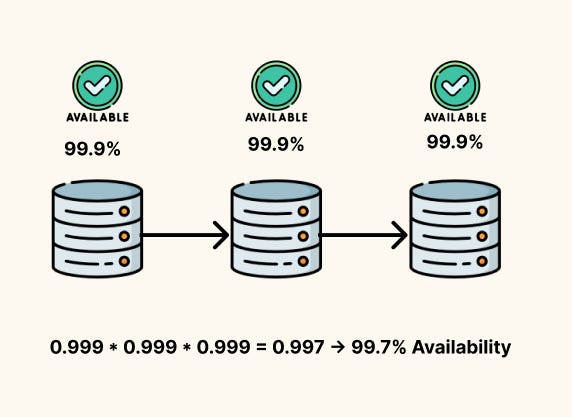
This adds up fast. Two components at 99.9% each give you 99.8% overall. Add a third and you’re at 99.7%. Every dependency on the critical path chips away at your budget.
How to fight this:
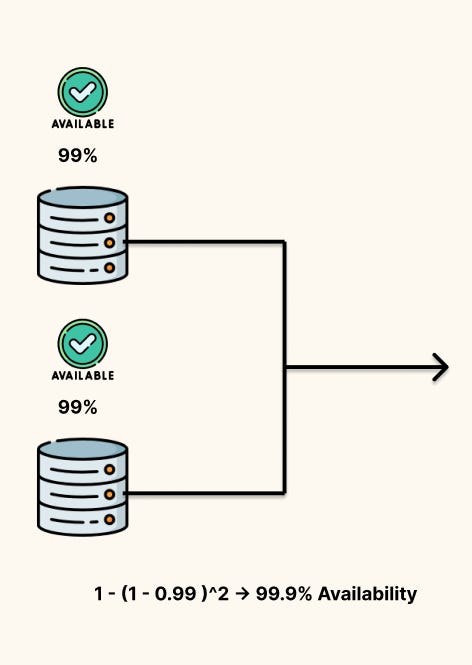
Add redundancy (parallel components): If either of two components can handle a request, availability becomes
\(A_{\text{parallel}} = 1 - (1 - A)^2\)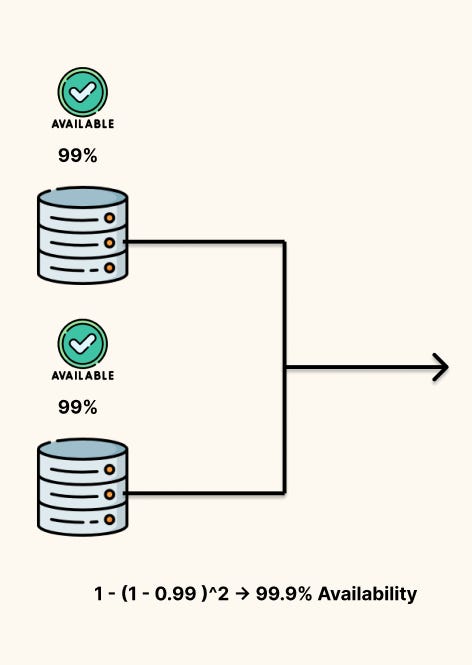
Two 99% components in parallel give you 99.99%, we had three components we would raise the power to three and so on. In the equation above, homogeneity in availability is assumed
Degrade gracefully: Keep the system working (even with fewer features) when non-critical dependencies fail. This removes them from the critical path.
Use caching and bulkheads: Isolate failures so one broken component doesn’t take down everything.
Practical Design Takeaways
1. Know your SLA before you build.
Four nines gives you 52 minutes of downtime per year — maybe 6–10 deployments with rolling restarts. Five nines gives you 5 minutes — one bad deploy blows the whole budget. Your uptime target directly limits how you release software.
2. Separate durability from availability.
Replication across zones helps both, but they need different investments. Durability is about storage: replication factor, write acknowledgment, backups. Availability is about traffic routing: load balancers, health checks, failover automation.
3. Use fault tolerance only where it matters.
Full fault tolerance is expensive. Use it where downtime directly costs revenue or loses data. Accept lower guarantees at the edges.
4. Build for low MTTR from day one.
Structured logs, distributed tracing, alerting on symptoms (not just infrastructure metrics), and automated recovery runbooks all pay off. Teams that skip this learn why it matters during a 2 AM outage with no context.
5. Count planned downtime in your SLA.
If your SLA tracks wall-clock time, planned downtime counts. Design deployments and maintenance to be zero-downtime from the start, not as an afterthought.